Ying-Yang

Login

Security Color Code
White
Gray
Black
Yellow
Blue
Red
Forgot Details?
Sign Up
Ying-Yang

Free Sign Up

Letters, Numbers, Underscores, Spaces.
Have an invitation code?
Date of Birth
21+ years of age only.
You must be at least 18 years old.
Security Color Code
Click any color below to set your Security Color Code.

*By clicking Submit, you are agreeing to our Terms of Service.

Already Registered? Login

Forgot Details

Enter your email and we'll send you your login details.

← Back to Login
Free Sign Up
Login
MyAsianFriend.com - Make a new Asian friend today.
semicircle3-red Ying-Yang
   home-white      |  About Us    |  Fun ▾    |  News 
Login  
|
Free Sign Up


Home


🎨 AI Photo Editor Guide

Transform any photo with simple text prompts

1 Credit = 1 AI Edit
Each transformation costs 1 credit. New accounts get free starter credits!
🔥 See Community AI-Edited Photos

Get inspired by what others are creating

⚡ Quick Start — Try These Prompts

Change Clothing
"Change her shirt to a red dress"
Swap Background
"Change the background to a beach at sunset"
Change Style
"Make this look like a Pixar movie character"
Adjust Expression
"Make her smile"
Remove Objects
"Remove the glasses"

🖼️ How It Works

Our AI understands context, so you don't need to describe everything in detail. Just tell it what you want to change, and it figures out the rest.

You can combine multiple changes in one prompt — change the outfit AND the background AND add a smile, all at once.

💡 Pro Tip

Be specific about what you want. "Red dress" works, but "elegant red evening gown" gives better results.

✨ Basic Transformations

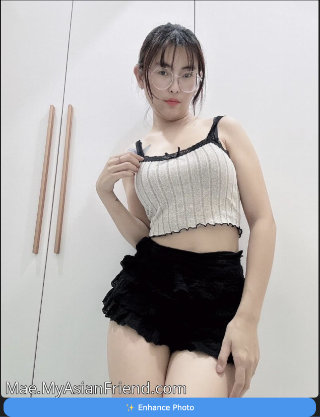
Original Photo

Original photo

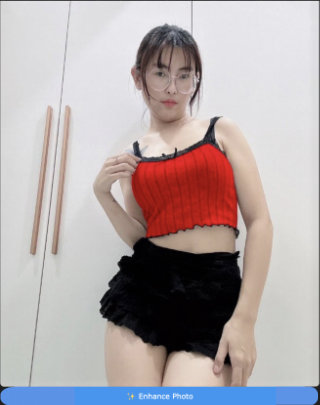
Prompt
Change shirt color to red
Red shirt result

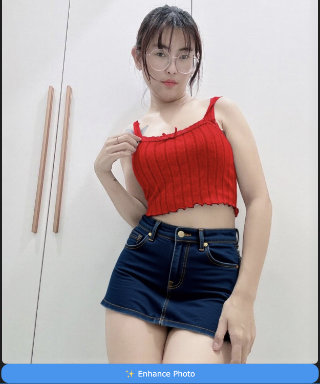
Prompt
Change shirt color to red, change skirt to tight fitting denim skirt
Red shirt and denim skirt

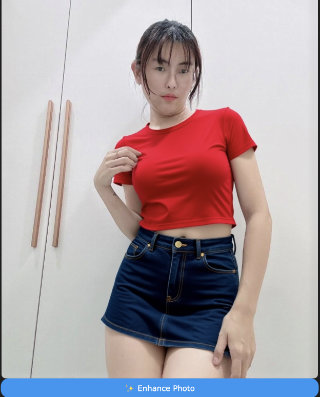
Prompt
Change shirt color to red, change skirt to tight fitting denim skirt. Remove glasses.
Glasses removed

Prompt
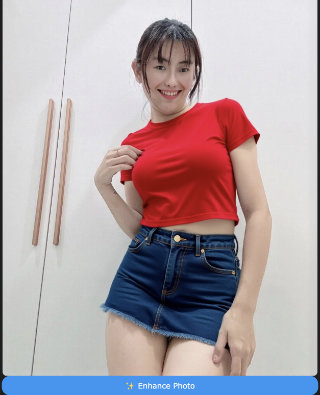
Change shirt color to red, change skirt to tight fitting denim skirt. Remove glasses. Make her smile.
Smiling

Prompt
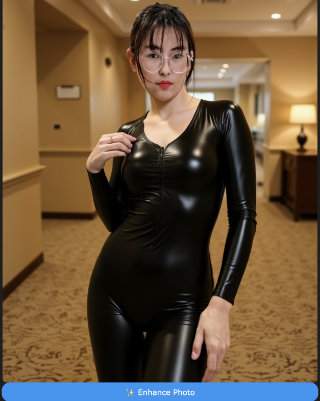
Change her clothing to a black latex bodysuit. Change the background to a hotel lobby.
Complete transformation

🎭 Style Transformations

Turn any photo into different art styles — cartoons, paintings, anime, and more.
Prompt
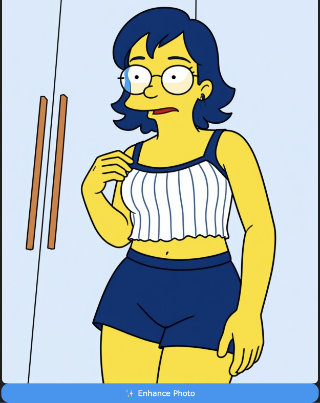
Change the style to The Simpsons cartoon style
Simpsons style

Prompt
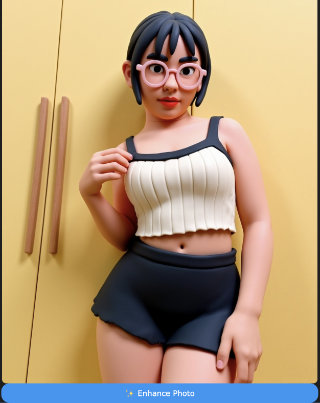
Change the style to claymation style
Claymation style

Popular Styles to Try

🎬 Cartoon / Animation

  • Pixar / 3D Disney
  • Studio Ghibli
  • 90s Anime
  • The Simpsons
  • South Park
  • Rick & Morty
  • Adventure Time
  • Claymation

🖼️ Classic Art

  • Van Gogh / Impressionist
  • Watercolor
  • Oil painting
  • Pop Art / Warhol
  • Art Nouveau
  • Ukiyo-e woodblock
  • Renaissance
  • Ink wash

✨ Modern / Digital

  • Cyberpunk neon
  • Vaporwave
  • Low-poly 3D
  • Pixel art / 8-bit
  • Holographic
  • Film noir
  • Retro-futurism
  • Glitch art

🧸 Fun / Quirky

  • LEGO minifig
  • Minecraft blocky
  • Funko Pop
  • Plushie / Felt
  • Papercraft
  • Chibi anime
  • Sticker style
  • Chalk drawing

👗 Fashion Vibes

  • K-Pop idol
  • Y2K retro
  • E-girl aesthetic
  • Harajuku
  • High fashion editorial
  • Old Hollywood glamour
  • Punk rock
  • Boho chic

📷 Photo Effects

  • Polaroid vintage
  • Film grain
  • Soft glamour
  • Cinematic
  • Golden hour
  • Black & white
  • Lomography
  • Dreamy / Ethereal

📝 Adding Text & Signs

You can add text to photos — signs, messages, captions.
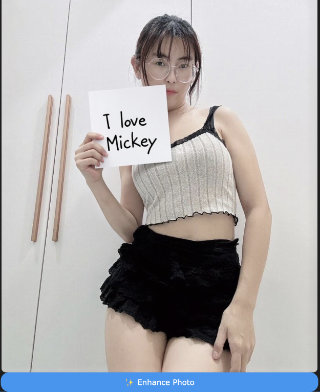
Prompt
She's holding a sign which says "I love Mickey"
Holding sign

⚠️ Note About Text

AI sometimes struggles with spelling. Short words work best. If the text comes out wrong, try regenerating or use simpler words.

🏖️ Background Changes

When changing backgrounds, you usually want the person to stay exactly where they are. Use this phrasing for best results:
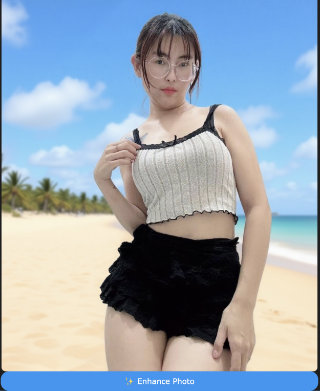
Better Prompt
Change the background to a beach while keeping her in the exact same position, scale, and pose. Maintain identical subject placement, camera angle, framing, and perspective. Only replace the environment around her.
Beach background

💡 Why the long prompt?

Simple prompts like "change background to beach" can accidentally shift her position or perspective. The extra instructions help keep everything anchored.

🎯 Tips for Better Results

✅ Be Specific

"Blue dress" → "Elegant navy blue evening gown with thin straps"

✅ Combine Changes

You can request multiple changes in one prompt. The AI handles them together.

✅ Describe What You Want, Not What to Remove

Instead of "remove the ugly background", say "change background to a clean white studio"

✅ Use Style References

"Like a magazine cover" or "cinematic lighting" helps the AI understand the vibe you want.

✅ Try Again

Not happy with the result? Run it again — AI output varies each time. You might get something better!

🚫 What to Avoid

❌ Vague Prompts

"Make it better" or "fix this" — too vague. Be specific about what you want changed.

❌ Too Many Changes at Once

Changing everything at once can confuse the AI. For complex transformations, do it in steps.

❌ Expecting Perfect Text

AI struggles with spelling. Keep text short and simple, or expect some regeneration attempts.

❌ Contradictory Instructions

"Make her taller but keep the exact same proportions" — some requests conflict. Keep it logical.

Ready to Start Creating?

Browse the girls' blogs and tap any photo to try the AI editor

Browse Photos

AI Photo Editor Guide