
Quick Navigation Button
 Click to go to main page of parent site.
 Click to go to main New page list.
Close
HUGE New AI Edit Upgrade as Two Magical Buttons Just Dropped
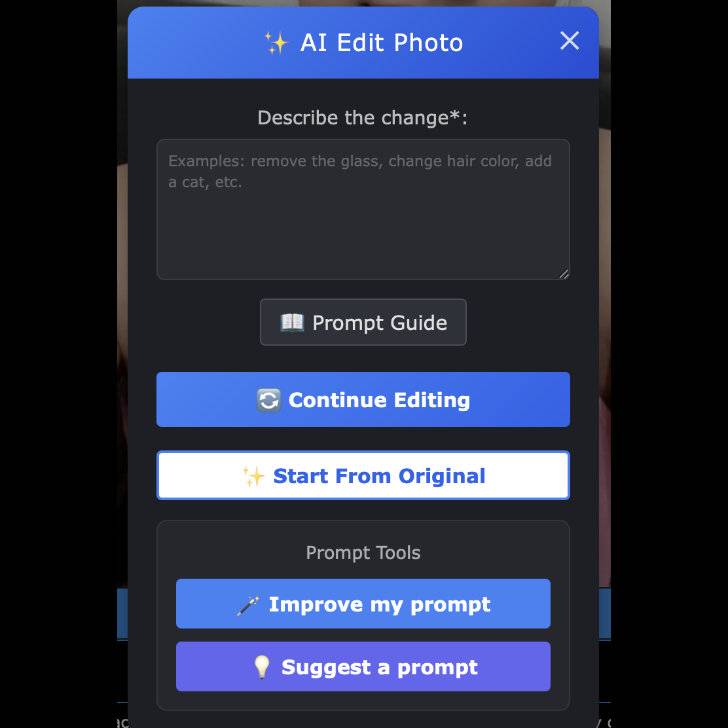
🚀 HUGE New AI Edit Upgrade — Two Magical Buttons Just Dropped!
Hey everyone, Mickey here — and I am so hyped for this one.
Today I’m rolling out a pair of brand-new AI tools that make editing the girls' blog photos WAY easier, WAY more fun, and honestly… dangerously addictive.
(You’ve been warned 😏)
🪄 NEW BUTTON #1 — “Improve My Prompt”
Struggling to describe the edit you want?
Typing something like “make her look nicer” or “fix her hair” but the AI needs a clearer instruction?
Boom. Hit Improve My Prompt.
The AI instantly rewrites your messy human thoughts into a clean, powerful, professional edit command —
without changing your intent.
- Keeps exactly what you meant
- Makes it sound like a perfect edit instruction
- Helps the model understand you better
- Works fast
Your simple line becomes a polished edit prompt ready to generate killer results.
💡 NEW BUTTON #2 — “Suggest a Prompt”
Forget coming up with a bad prompt and needing it to improve it, what if you can't even think of any prompt? Ohhh this one is the fun chaos button.
Click it and the AI will analyze the actual image — the pose, outfit, background, colors, vibes — and then dream up a creative, exciting, visual idea you can turn into an edit instantly.
We’re talking:
- ✨ Fantasy scenes
- ✨ Themed outfits
- ✨ New backgrounds
- ✨ Props
- ✨ Lighting transformations
- ✨ Cute, bold, fun, or dramatic concepts
It doesn’t rewrite your idea —
it creates an original one that fits the photo, like a little creative director sitting beside you.
Perfect when you want inspiration or want to make the blog photos stand out in a crazy fun way.
🔥 Why this matters
These tools open up a whole new level of expression for your blogs.
Anyone can now create gorgeous edits, even if you’re terrible at writing prompts or don’t know what you want yet.
It unlocks unlimited fun — go wild with it!
💎 A quick note for new fans
Right now, AI Edit features are enabled only for fans who’ve topped up at least a little bit (even $1).
These features cost real processing power on my side, so this helps keep things running smoothly.
I may adjust it later, but this is the setup for now. Don't worry though, I have another AMAZING project which will be available to ALL--it's done, but I'm spending time testing it. Until then, don't be such a Cheap Charlie and top up even if it's just $1.
🎉 Have fun — seriously!
Go test the new buttons.
Break them.
Get creative.
Make something wild and post it to the public AI Edit Feed so everyone can see what you come up with.
This update makes the blogs way more fun — and I can't wait to see what you do with it ❤️
-Mickey
∼ Comments ∼