
Quick Navigation Button
 Click to go to main page of parent site.
 Click to go back to News list (returns to your position).
Close
You Can Now Block Individual Girls from Messaging You
You Can Now Block Individual Girls from Messaging You
I've added a feature that many of you have been waiting for. You can now block any girl from sending you messages, directly from your chat window.
Why This Feature Exists
Let's be honest. Most of the girls here are great, and they respect your boundaries. But occasionally, someone gets a little too enthusiastic with the sales pitches and copy-paste messages, and saying "no thank you" three times doesn't always do the trick. You know who you are. Rather than letting one persistent girl ruin your experience on the site, you can now just quietly block them and move on with your day.
How It Works
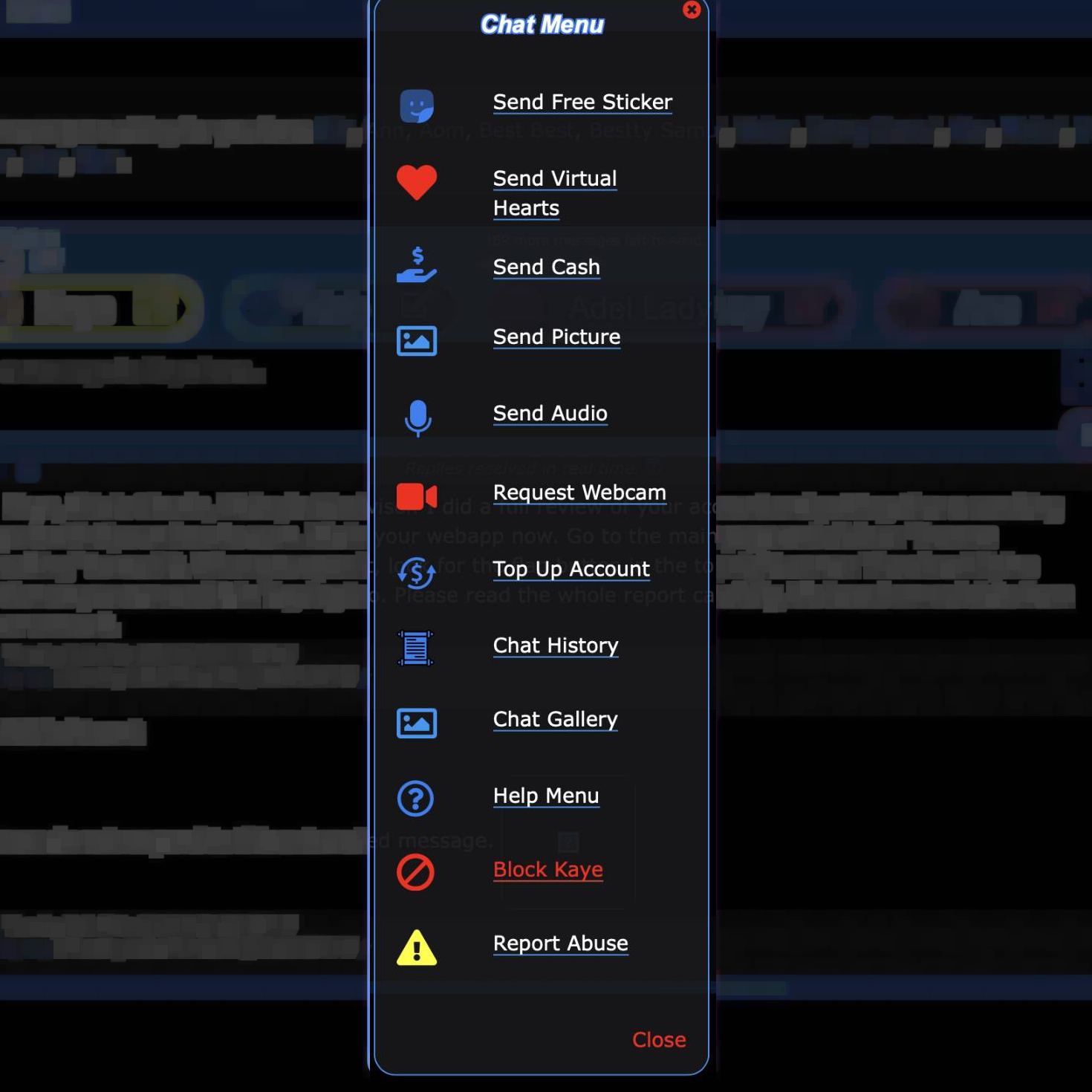
Open a chat with the girl you want to block, then tap the blue + button to open the Chat Menu. You'll see a new red "Block [Name]" option right above Report Abuse. Tap it, confirm, and you're done.
Once blocked, you will no longer receive any messages from that girl. The girl will not be notified that you blocked her. From her side, everything looks normal. Her messages just quietly stop reaching you.
You can still view a blocked girl's profile and blog. Blocking only affects chat messages.
Changed Your Mind?
No problem. A blocked girl still appears in your chat bar, just slightly dimmed. Tap on her name, open the Chat Menu again, and the button will now say "Unblock [Name]" in green. Tap it and you'll start receiving her messages again.
One thing to note: any messages she sent while you had her blocked will stay hidden. Only new messages after unblocking will come through.
As always, if a girl crosses a more serious line, the Report Abuse button is still there for that. Blocking is for the "please stop messaging me" situations. Reporting is for actual problems.

∼ Comments ∼